
Browsing this Thread:
1 Anonymous Users


|
Re: VirtualBox, AspireOS ed icaros desktop
|
||||
|---|---|---|---|---|
|
Just popping in
 

|
Hi. Thanx for reply.
For the IDE hardfile I can tell you that both *.vdi file are in FIXED size, 2GB for AspireOS and 4GB for icaros desktop. The shared vdi hardfile is always FIXED to 2GB. No dynamic allocation. For USB, I tryed it but don't work ! :( Any other idea ? Thanx for all ! bySpawnPPC
Posted on: 2015/2/25 14:16
|
|||
|
||||


|
Re: VirtualBox, AspireOS ed icaros desktop
|
||||
|---|---|---|---|---|
|
Home away from home
 
|
Quote:
The only thing left that i can think of that might cause issues would that you do not use a fixed size virtual HD (but one that grows in size). Quote:
A picture tells more then a thousand words (i hope)  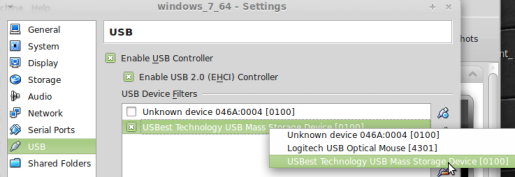 It would perhaps help to also have a look at the virtualbox online manual about usb and the extension pack.
Posted on: 2015/2/25 12:26
|
|||
|
||||
|
Re: VirtualBox, AspireOS ed icaros desktop
|
||||
|---|---|---|---|---|
|
Just popping in
|
Hi. Thanx for reply.
The controller is IDE on both AspireOS and icaros desktop, NO SATA ! "make sure you 'untap' USB 2.0 support for your AROS VM" How I can do that ? "you are using a hosted platform that requires you to filter USB devices manually" How I can do that ? Thanx for your help ! bySpawnPPC
Posted on: 2015/2/25 12:09
|
|||
|
||||
|
Re: VirtualBox, AspireOS ed icaros desktop
|
||||
|---|---|---|---|---|
|
Home away from home
|
Thanks for your quick informative answers
Quote:
Sorry, my fault. I actually meant did you configured the HD to be attached to IDE, SATA or SCSII ? IDE is the most compatible, SCSII will certainly fail. I believe AspireOS could have problems with SATA. fwiw: the chipset you chose is ok All the other options seem fine to me, e.g. they work for me. Quote:
Yups, i did understand that. but thanks for making sure :thumbsup: Quote:
Two possible causes: 1) make sure you 'untap' USB 2.0 support for your AROS VM. 2) VirtualBox is known to have problems with USB on certain hosted hardware, especially with newer versions of VirtualBox. That is (also) reason i use a very old version of virtualbox as it removed USB support for me at a certain version number. 3) you are using a hosted platform that requires you to filter USB devices manually (not needed on windows). AspireOS not seeing your virtual harddisk should solve itself (depending on your VM's configuration), but i certainly need more time for the network related issue. It could very well be another 'bug' in newer VirtualBox version. You do not need to 'mount' your virtual HD, just attaching it in the VM and being formatted as SFS should be enough to make it automatically be detected by aros, so i suspect you configured the AROS vm using a SATA controller (just a guess)
Posted on: 2015/2/25 2:44
|
|||
|
||||
|
Re: VirtualBox, AspireOS ed icaros desktop
|
||||
|---|---|---|---|---|
|
Just popping in
|
Your English isn't a problem and thanx for fast reply ! XD
These are the replies to your questions: - Which version of virtualbox do you use ? Latest one V. 4.3.22r98236 - What type of HD controller did you select for your AROS VM ? In AspireOS VM and icaros desktop VM, togheter at "PIIX3" - What filesystem did you use for formatting the virtual HD ? All AROS VM hardfiles are frmatted in Smart FileSystem - BE mode - What network controller was used for the AROS VM ? All AROS VM use in VB PCnet-PCI II in NAT mode - What network controller did you configure in AROS ? All AROS installations use "pcnet.device" as network controller. Just for tell to you, all in icaros work fine. AspireOS work fine but LAN don't work (so internet don't work, too) and it don't see the second hardfile. Thanx for future replies. Bye Bye ! bySpawnPPC P.S.: Another problem just now... icaros and AspireOS don't see my PenDrive on USB 2.0 or 3.0 ports. Any idea ?
Posted on: 2015/2/25 2:07
|
|||
|
||||
|
Re: VirtualBox, AspireOS ed icaros desktop
|
||||
|---|---|---|---|---|
|
Home away from home
|
Sorry for the English, i'll try to be brief so you could use google translate.
- which version of virtualbox do you use ? - What type of HD controller did you select for your AROS VM ? - What filesystem did you use for formatting the virtual HD ? - What network controller was used for the AROS VM ? - What network controller did you configure in AROS ? fwiw: All issues mentioned do work correctly for me. PS: i would really advice to use icaros desktop (perhaps in your case using the light version) as AspireOS is really old now and lacks some features. You can 'undress' icaros desktop pretty much to mimic AspireOS.
Posted on: 2015/2/25 0:35
Edited by magorium on 2015/2/25 0:59:09
|
|||
|
||||
|
VirtualBox, AspireOS ed icaros desktop
|
||||
|---|---|---|---|---|
|
Just popping in
|
Salve a tutti. Mi presento, sono Emanuele, meglio conosciuto come SpawnPPC sulla rete. Sono un Amighista sfegatato e mi sto dilettando un p? su tutti i S.O. alternativi, compreso ovviamente AROS e derivati.
Nello specifico sto creando una macchina virtuale con tutti i S.O. di mio interesse. Ho iniziato proprio da AspireOS ed icaros desktop che sono riuscito tranquillamente a far funzionare. Vi anticipo che faccio l'informatico da ben 30 anni e che sono molto esperto un p? di tutto... ma, sinceramente, sono incappato in 2 problemi di natura tecnica che non riesco a risolvere. Magari se mi ci applico riesco, ma vorrei evitare di perdere tante ore, se non giorni, a studiare una cosa che sicuramente qualcuno di voi avr? gi? risolto. Detto questo, i problemi sono: 1- AspireOS non vuole configurare la scheda di rete come dico io e di conseguenza non si proietta su internet 2- AspireOS non monta in avvio un hardfile creato con VirtualBox, partizionato e formattato con icaros desktop Per risolvere il primo problema ho pensato di aggiornare i DEVICE di RETE di AspireOS tentando di copiare quelli di icaros desktop in modo da poter provare con DEVICE pi? recenti (visto che AspireOS ? fermo al 2013, se non erro). Probabilmente non risolvo ma volevo fare un tentativo... ma sono incappato nel secondo problema, e cio? un hardfile di VB, gi? partizionato e formattato correttamente e che icaros desktop VEDE tranquillamente, AspireOS non lo vede. Eppure ho fatto tutto preciso alla lettera, o almeno credo. Se riuscissi a fare una cosa del genere, potrei usare questo hardfile come partizione comune per condividere files tra tutti gli AROS compatibili. L'idea ? geniale, se solo riuscissi a far vedere questo hardfile ad AspireOS. Ah, tanto per essere precisi... l'HDToolBox di AspireOS vede il secondo canale ide e vede l'hd partizionato sopra... ma non si riesce a farlo partire in nessun modo. Devo sicuramente montare la risorsa in DEVS ma come fare che AspireOS su internet non ci va, l'hardfile non lo condivide e non posso fare niente altro ? Qualche idea ? Grazie a tutti ! bySpawnPPC
Posted on: 2015/2/24 22:04
|
|||
|
||||
You can view topic.
You cannot start a new topic.
You cannot reply to posts.
You cannot edit your posts.
You cannot delete your posts.
You cannot add new polls.
You cannot vote in polls.
You cannot attach files to posts.
You cannot post without approval.
You cannot use topic type.
You cannot use HTML syntax.
You cannot use signature.
You cannot create PDF files.
You cannot get print page.


